
AI-powered CAD workbench
Generate Any New Design.
Anytime.
Ganda turns plain English into production-ready 3D models. Multi-step build planning, 60+ parametric components, CadQuery geometry on the OpenCascade kernel, visual AI verification, and self-improving error recovery.
Workflow
From idea to print-ready model
Six steps, under a minute. Ganda handles the CAD scripting, validation, and error recovery.
Describe
Tell Ganda what you need in plain English. Specify dimensions, features, and constraints — or @-mention a library component as a starting point.
Plan
Complex designs are decomposed into up to 8 ordered build steps with shared skeleton dimensions and dependency tracking.
Build
CadQuery scripts are generated step by step on the OpenCascade B-rep kernel. Each script is AST-validated before execution.
Verify
AI reviews 4-angle shaded renders against your intent with confidence scoring. Failed checks trigger automatic correction and retry.
Refine
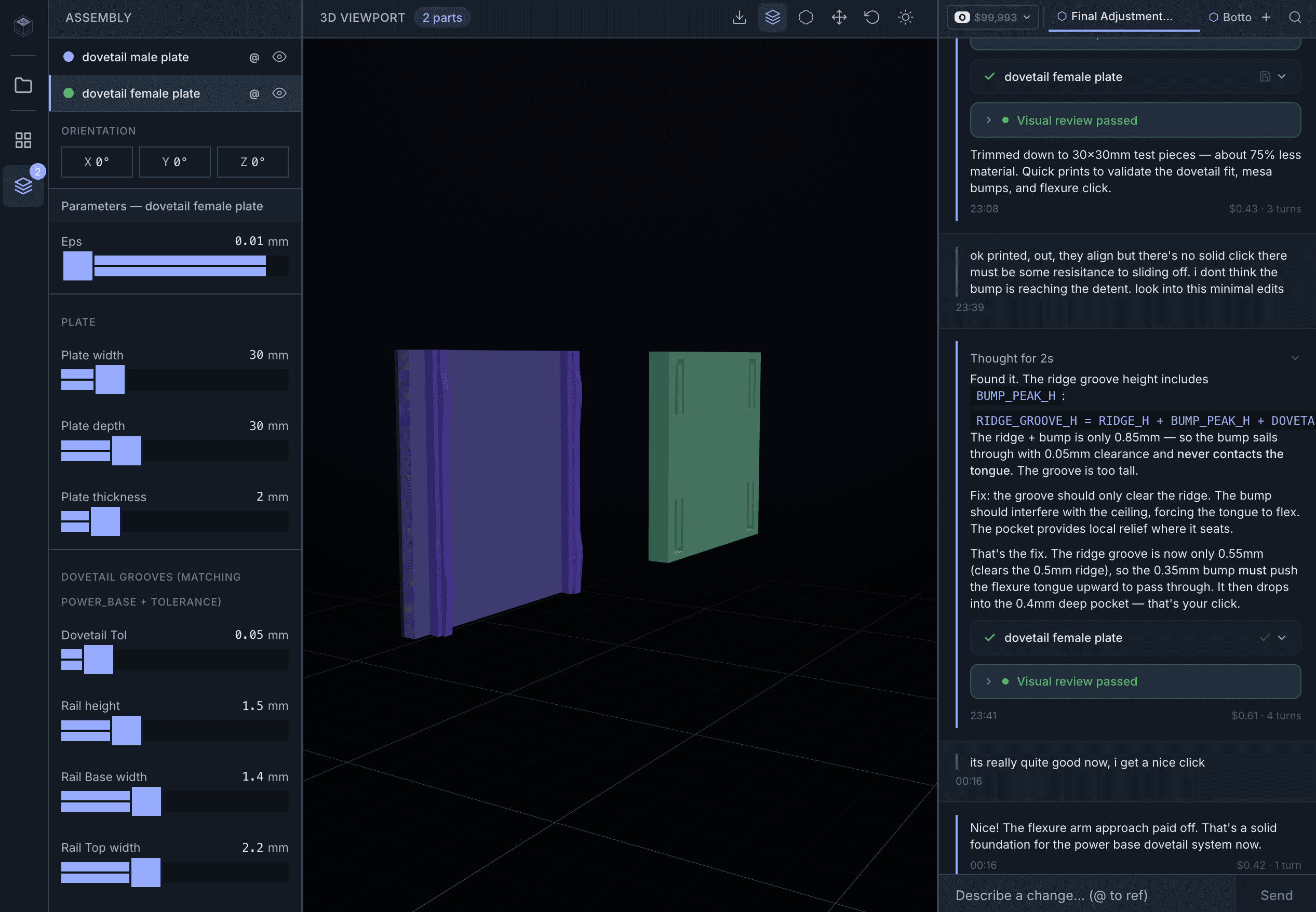
Adjust parameters with live sliders, describe changes in conversation, or click ghost mesh sections to target specific geometry.
Export
Download STL or STEP. Parts are auto-oriented for minimal support material and geometry-validated before export.
From description to verified, print-ready model in under a minute.
Examples
See it in action
Design a Raspberry Pi 4 enclosure with ventilation slots, screw mounting posts, and a snap-fit lid.
I'll create a two-part enclosure with internal mounting posts matching the Pi 4 hole pattern. The base has ventilation slots along both sides and cable cutouts for USB-C, micro-HDMI, and GPIO. The lid uses snap-fit clips for tool-free assembly.
- Parts
- 2 parts: base + lid
- Dimensions
- 90 x 65 x 32 mm
- Volume
- 42.7 mm³
- Printer
- Fits A1 mini
Each example was planned, built, verified, and exported in under a minute.
Comparison
How we compare
Traditional CAD
Text-to-CAD Tools
Ganda
Traditional CAD
Text-to-CAD Tools
Ganda
Capabilities
Built for 3D printing
AI CAD generation
Describe a part in plain English and get a parametric CadQuery script on the OpenCascade B-rep kernel. Proper fillets, chamfers, and print-friendly geometry — no CAD expertise required.
Real-time 3D preview
Instant Three.js rendering with orbit controls. Colour-coded multi-part display, 90° rotation controls, and ghost mesh overlays.
Parametric editing
Live sliders parsed from script annotations. Adjust wall thickness, hole diameter, or any dimension — the part re-executes instantly with no AI call.
60+ component library
Pre-tested parametric components across 9 categories — enclosures, fasteners, joints, gears, mounting hardware, and more. Type @ to browse, or mention by name to use as a starting point.
Multi-part assemblies
Build planner decomposes complex designs into up to 8 ordered steps with shared skeleton dimensions. Automated hole alignment validation across parts.
Iterative refinement
Describe changes in conversation or click ghost mesh sections to target specific geometry. Claude reads existing context and applies search/replace edits with fuzzy matching.
Visual AI verification
After generation, Claude reviews 4-angle shaded renders against your intent with structured confidence scoring. Auto-corrects if below threshold, with zoomed diff views for edits.
Self-improving error recovery
Errors are classified into 8 types with operation-specific retry strategies. A knowledge base records every successful fix and consolidates patterns over time — the system gets better the more it’s used.
Print validation & auto-orient
B-rep topology analysis, ShapeFix auto-repair, mesh watertightness, and FDM checks — overhangs, wall thickness, bridge spans. Parts are auto-rotated for minimal support material before export.
Ghost mesh X-ray
Transparent overlays reveal intermediate construction steps within a part. Hover to see section names, click to reference them in chat for targeted modifications.
Pricing
Simple, generation-based pricing
One generation = one AI-designed part. No hidden fees, no per-seat charges.
+10 for £5
+10 for £4
FAQ
Frequently asked questions
An AI-powered CAD workbench that turns natural language into production-ready 3D models. You describe a part in the chat, Claude generates a parametric CadQuery script, a persistent Python worker executes it on the OpenCascade B-rep kernel, and the result renders in an interactive Three.js viewport — all in under a minute.
No. Describe what you want in plain English — dimensions, features, constraints — and Ganda handles the CAD scripting. Refine designs conversationally ("make the walls thicker", "add M3 mounting holes") or use parameter sliders to adjust dimensions in real-time without reprompting the AI.
Ganda classifies your intent — whether it’s a simple tweak, a new part, or a multi-part assembly — and adjusts its thinking budget accordingly. Simple edits get fast, focused responses; complex assemblies get deep reasoning with up to 16,000 thinking tokens. You can choose between Sonnet (faster, ~£0.50/part) and Opus (deeper reasoning, ~£2.00/part) on Maker and Pro plans. The system prompt includes FDM design rules, tolerance tables, CadQuery guardrails, and relevant reference material selected automatically by keywords in your message.
When you describe a complex design, Ganda doesn’t try to generate everything in one shot. It produces a structured build plan with up to 8 ordered steps — base geometry first, then internal features, attached parts, subtractive cuts, refinements, and joining features. Each step can load previously built geometry via STEP files for precise mating. Simple single-part requests skip the planner entirely.
A collection of 60+ pre-tested parametric CadQuery components across 9 categories: enclosures, fasteners, joints, motion (gears, pulleys, springs), mounting hardware, structural reinforcement, calibration parts, ventilation, and utilities. Type @ in the chat to browse them, or mention one by name (like @HeatSetInsertBoss or @ParametricEnclosure) to inject its full script as a starting point. Every component has configurable parameters with documented ranges.
Every generated script annotates key dimensions with range metadata — for example, WALL_T = 3.0 # [2:5]. The editor parses these annotations and renders interactive sliders grouped by section. Drag a slider and the part re-executes instantly with the new value, no AI call needed. If a script doesn’t have annotations, Ganda infers sensible ranges automatically from the default values.
Ghost meshes are transparent overlays that show intermediate construction geometry within a part. During generation, Claude marks major construction steps with @ghost annotations. Hover over a ghost to see its name (like "Base Plate" or "Ventilation Slot"), then click to reference that specific section in chat for targeted modifications. They’re generated in the same CadQuery execution as the main part — no second AI call required.
Yes, on Maker and Pro plans. The build planner decomposes complex requests into ordered steps with shared skeleton dimensions. Each step can reference previously built geometry for precise mating. After building, Ganda validates hole alignment across parts — diameter match within 1mm, XY offset within 0.5mm — and feeds any misalignment back to the AI for automatic correction.
Available on Maker and Pro plans. After generating geometry, Ganda renders 4 shaded views (front, right, top, isometric), converts them to images, and has Claude analyse them against your original description with a structured confidence score. If confidence drops below the threshold, it generates specific corrections and retries — up to 2 review cycles. For edits, it also renders zoomed diff views focused on the changed region to catch regressions.
Yes. A knowledge base records every successful error→fix pair, classified by error type (syntax, kernel, topology, dimensional, visual) and CadQuery operation (fillet, chamfer, shell, boolean, loft, sweep, revolve). When a similar error occurs, the most effective fixes are injected into the retry prompt. Over time, the system consolidates repeated fixes into generalised rules — genuinely improving with each failure.
A multi-stage pipeline: B-rep topology analysis (20+ defect classes including free edges, non-manifold geometry, and self-intersecting wires), auto-repair via ShapeFix, solid count verification, volume validation (catches degenerate geometry), dimension checks (flags sub-0.1mm features and >500mm parts), mesh watertightness, and FDM-specific analysis — overhang detection (>45°), wall thickness sampling (≥1.2mm minimum), and bridge span estimation.
Before exporting, Ganda tests 5 candidate orientations by rotating the mesh and scoring overhang area. It picks the orientation with the least overhangs (faces >45° from vertical), repositions the part flat on the build plate, and re-exports the STL. This reduces support material automatically — you get a print-optimised file without manual rotation in your slicer.
STL for direct 3D printing (all plans) and STEP for further editing in traditional CAD software like Fusion 360 or FreeCAD (Maker and Pro plans). Both formats are geometry-validated before export. You can set a persistent download directory or use your browser’s save dialog for each file.
Any FDM printer that accepts STL files. The validation pipeline is calibrated for a 0.4mm nozzle with a 180×180×180mm build volume (Bambu Lab A1 mini defaults), but generated parts work on any printer. You can also open models directly in Bambu Studio for slicing.
Conversations are stored server-side with full message history, part data, and ghost meshes. You can switch between conversations, rewind to any previous message (restoring the exact part state at that point), and save individual scripts to a personal library with auto-generated thumbnails. The project dashboard lets you organise work into phases with progress tracking, bills of materials, and budget management.
Three plans: Free (£0, 5 generations per day, Sonnet model, STL export), Maker (£39/month, 100 generations, adds STEP export, Opus model, multi-part assemblies, visual verification, and parametric editing), and Pro (£79/month, 300 generations, adds priority support). Maker and Pro plans include top-up packs when you need more generations. One generation = one AI-designed part.